





Kio
the AI assistant in your panel
Kio is the AI assistant built into the Sadakio panel for cafés and small businesses. It looks at your own data, sees who is drifting away and which day is quiet, and prepares a suggestion you can apply with one tap.
What Kio sees,
what it suggests
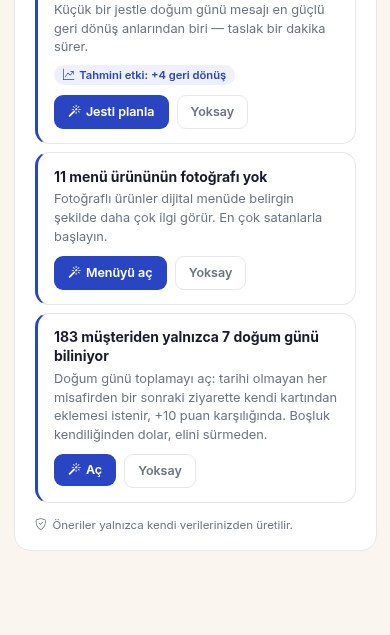
Every suggestion says what Kio noticed and its estimated effect. One button is enough to apply it.
Regulars drifting away
If guests who used to come often have not been in for a month, Kio tells you. It opens the screen for a personal «we miss you» campaign.
One stamp from a reward
It finds guests who are one stamp from their reward and have not come in for a week. It suggests a campaign once there is a group of at least three, not for a single person.
Your quiet day
It looks at your visits and finds your quietest day. It suggests making that day a double stamp day and tells you if the quiet day changes.
Birthdays
It shows the guests who have a birthday this week. For guests whose date is unknown, you switch on birthday collection with one tap.
Campaign drafts
Kio writes the campaign text, you edit and approve it. The audience is picked from guests close to a reward or guests drifting away.
Menu help
It reminds you about items without a photo. It reads the items and prices from a photo of your paper menu, and you check and save them.
How does Kio work?
It reads your data
Visits, stamps, rewards, birthdays and your menu. All of it is already in your panel.
It prepares a suggestion
It writes what it noticed on a short card and shows the estimated effect. With too little data it does not make pointless suggestions.
You decide
Apply, edit or dismiss. Kio never sends messages on your behalf.
Kio also prepares campaign visuals. The details are on the Poster Studio (Afiş Stüdyosu) page.
Questions about Kio
Which data does Kio use?
⌄
Kio uses only your own business data: visits, stamps, rewards, birthdays and your menu. Suggestions are generated from your own data alone.
Which plan includes Kio?
⌄
Campaigns and suggestions with Kio are part of every paid plan, including Starter. You can also use Kio during the 14-day free trial.
What are Kio credits?
⌄
AI tasks such as writing text or reading a menu from a photo use Kio credits. Credits are added to your account every month, and you see your balance and spending in the panel.
Does Kio message my guests on its own?
⌄
No. Kio prepares suggestions and drafts. You decide whether a campaign is sent.
How do I remove a suggestion I do not want?
⌄
Tap Dismiss on the card. That suggestion is not shown again for a while. The panel shows at most three suggestions at a time, so the list never gets crowded.
Related pages
See Kio’s first suggestion
this week
14 days free, +30 days after your first 20 stamps, no card needed.