



Appointment booking
for hairdressers, barbers and salons
Sadakio appointment booking is for beauty salons, hairdressers and barbers. The guest picks a free slot and leaves a booking request, and you approve it with one tap. A stamp is added to the loyalty card of every guest who turns up, automatically.
Diary, phone and card
on one screen
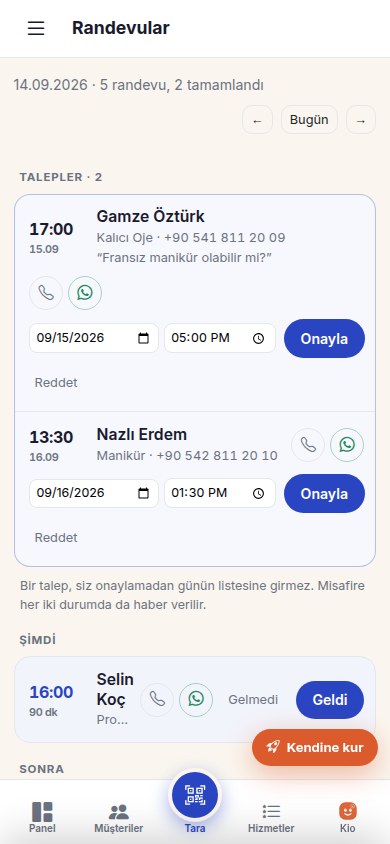
Your appointments, guest cards and campaigns are in the same panel.
Free slots only
The guest picks your service and sees the free slots for the next 14 days. Booked slots do not appear in the list. You decide how many guests you can take at the same time.
You approve
Every request comes to you first. You confirm it with “Approve”, and change the time if you need to. The guest is told either way.
Service list with prices and durations
Guests see your services with their prices and durations. If the service they want is not listed, they tap “Not in the list” and type it themselves.
Import your diary from a photo
Take a photo of your paper diary. “Fill the day from a photo” reads the appointments, and you check and save them.
A stamp when guests turn up
When you mark a guest “Arrived”, a stamp and a visit go on their card. Guests who do not turn up earn no stamp. Your loyalty programme works together with your appointments.
The day's list
Appointments are sorted into Now, Later and Done. You call the guest with one tap or message them on WhatsApp.
How does appointment booking work?
Open your page
Turn on online requests in the panel and choose how many guests you can take at the same time. Your services and opening hours are already saved.
The guest leaves a request
The guest picks the service and a free slot and types their name and phone number. The request reaches you as a notification.
Approve it and give the stamp
Approve or decline the request. When the guest arrives, mark them “Arrived” and the stamp is added to their card.
Questions about appointment booking
Does the guest confirm the appointment themselves?
⌄
No. The guest picks a free slot and leaves a request. The request does not enter the day's list or block the slot until you approve it. You can change the date or time when you approve. If you decline, the guest is told too.
Which times does the guest see?
⌄
The guest sees only 30-minute slots that are genuinely free. The slots come from the opening hours on your page. You set how many guests you can serve at the same time in the panel. The next 14 days can be booked.
How do I move the appointments from my paper diary?
⌄
Take a photo of the diary page, and “Fill the day from a photo” reads the lines. You check and approve each line before it is saved. This feature uses Kio AI credits. You can also add appointments by hand.
Does a guest who turns up for an appointment earn a stamp?
⌄
Yes. When you mark the appointment “Arrived”, a stamp and a visit are added to the guest's card, with no need to scan a QR code. An appointment marked “No show” earns no stamp. If you mark it by mistake, you fix it with “Undo”.
Which businesses can use the appointment system?
⌄
The Appointments section is available to businesses registered as a beauty centre, hairdresser or barber. The online request page starts switched off, and you turn it on with one tap in the panel.
Where does the guest keep track of their appointment?
⌄
After leaving a request, the guest is told whether it was approved or declined. Guests who use the Sadakio ID app see their upcoming and past appointments, with their status, in the app.
Related pages
Move your appointment diary
to your phone
14 days free, +30 days after your first 20 stamps, no card needed.